 RageKit
What is a YPT file and how do you edit one?
A .ypt file is a GTA V particle effects dictionary: effect rules, emitter rules and particle rules, with the textures and models they draw. Smoke, fire, sparks, water spray and weather effects are YPT files. RageKit opens a .ypt, lists its effects with a live preview, edits the rules, behaviours and keyframe curves, and builds it for FiveM or a DLC pack.
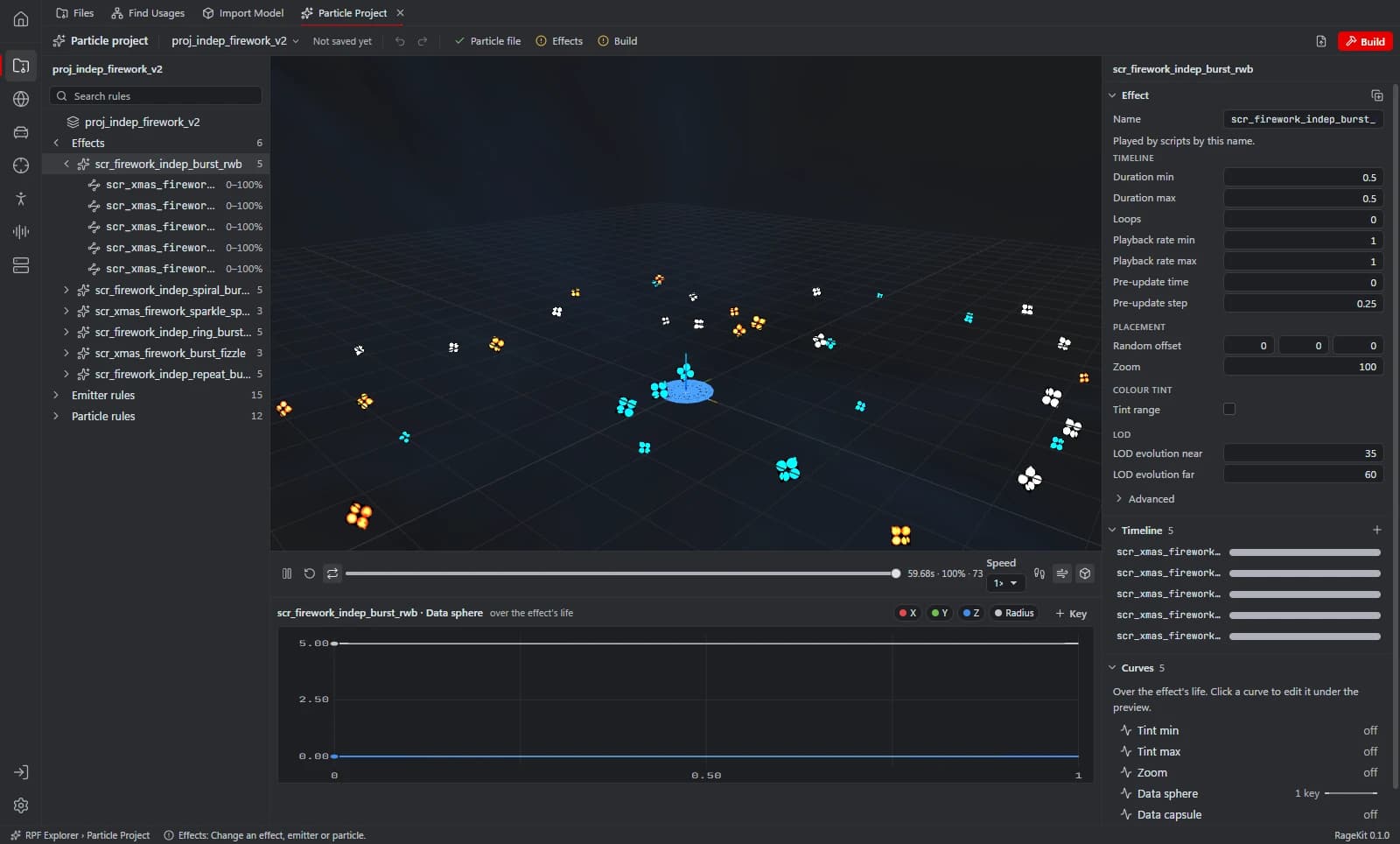
What's inside a .ypt file
- Effect rules: what plays, and when, on a timeline.
- Emitter rules: where and how fast particles spawn.
- Particle rules: how each particle looks and behaves, as a list of behaviours with keyframe curves.
- The textures and models the particles draw.
How to open a .ypt file
Open where the file is
In the RPF Explorer choose Open GTA V to browse the game's archives, Open RPF… (Ctrl+O) for a single archive, or Open folder… for loose files such as a FiveM resource. Dropping an
.rpfor a folder onto the window opens it too.Select the .ypt
The Effects view lists the effect, emitter and particle rules and previews the selected effect. Textures and Materials show what it draws.
Edit the rules
Change emitters, particles, behaviours and curves. The preview plays the result.
Save or build
Save back into the archive, or choose Save as project / Build… to keep it as a project and build a FiveM resource or singleplayer pack (Premium).
What RageKit does with .ypt files
- List and preview every effect in a dictionary
- Edit effect, emitter and particle rules, behaviours and keyframe curves
- Add, duplicate, rename and remove rules, with references followed
- Swap textures
- Build the
.yptas a FiveM resource or singleplayer pack (Premium)
Tools that read and write .ypt
| Tool | RageKit | Notes |
|---|---|---|
| Particle project | Reads and writes | Particle dictionaries; embedded textures and models are read-only |
Questions
What program opens YPT files?
RageKit opens .ypt files from its RPF Explorer, with a preview and an editor. See the particle editor.
How do I use a custom particle effect in FiveM?
Put the .ypt in a resource's stream/ folder and load the asset in your script with RequestNamedPtfxAsset.
Can I change the textures in a YPT?
Yes. A particle can use one of the file's own textures or one of the game's shared ones.
Guides
Related file formats
- .ytd · texture dictionaryA YTD file is a GTA V texture dictionary. How to open and view .ytd files, export textures to PNG or DDS, replace a texture and shrink oversized ones.
- .ydr · drawableA YDR file is a GTA V drawable: one 3D model with its shaders and LODs. How to open and view .ydr files, export them to GLB and make one from FBX or OBJ.
- .rpf · RPF archiveAn RPF file is a GTA V archive that holds the game's models, textures, maps and data. How to open, extract and edit .rpf files on Windows for free.
- GlossaryEvery GTA V modding format and term on one page
Open .ypt files with RageKit
Free download for Windows 10 and 11. No account needed for the free tools.
There's no Windows installer on the latest release yet. Check the changelog for when it lands.