 RageKit
Addon vehicle studio for FiveM and GTA V
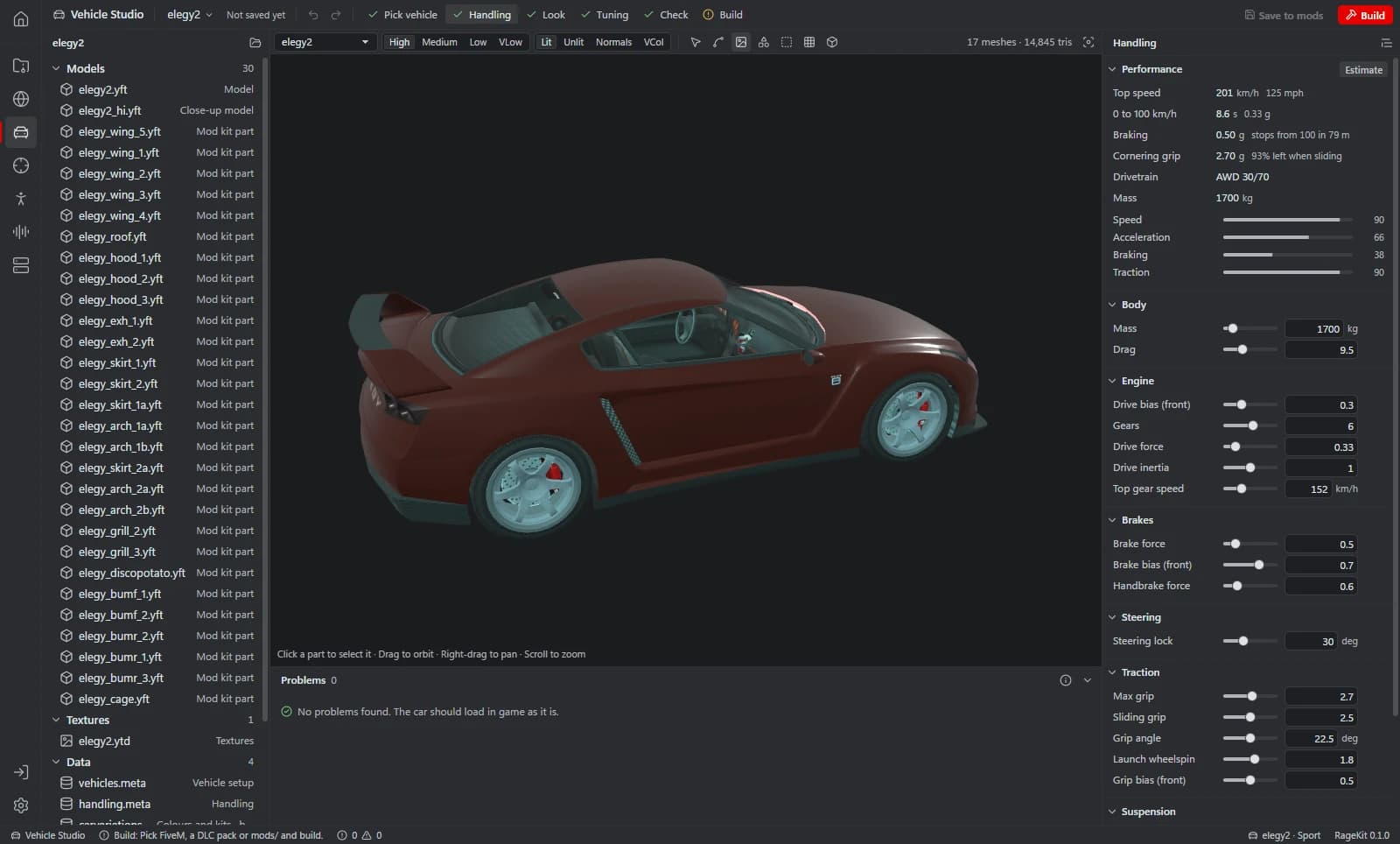
Vehicle Studio edits a GTA V vehicle's handling.meta, vehicles.meta, carvariations.meta and carcols with the car in a 3D preview: handling with live performance estimates, colour combinations, siren light patterns, liveries and mod kits. New vehicle from this one makes an addon copy under a new name, and Build packages it as a FiveM resource or singleplayer DLC pack.
What it does
- Open a vehicle from the game, a DLC pack, a FiveM resource folder or an .rpf
- Handling: mass, drag, drive force, top speed, gears, brakes, steering, traction and suspension, plus every other field and raw XML
- A live performance card with estimated speed, acceleration, braking and traction
- vehicles.meta: names, class, wheel and plate type, common flags as toggles
- Colour combinations with a 3D paint preview
- Sirens: a 20-light pattern grid with 32-step flash and rotation patterns and an animated preview
- Liveries: make a UV template, apply a PNG, JPG, TGA, BMP or DDS, and watch the file for live preview
- Mod kits, parts, extras and custom rims, with one part per slot previewed in 3D
- New vehicle from this one: copies the model, textures, handling and colours under a new name
How it works
Pick vehicle
Open a vehicle, or Try an example with the game's Sultan.
Handling
Tune handling and watch the performance estimates change.
Look
Set colours, sirens, lights and liveries.
Tuning
Edit mod kits, parts, extras and rims.
Check and build
Run the checks, then build a FiveM resource, DLC pack, OIV or a copy in mods/.
File formats
| File | RageKit | Notes |
|---|---|---|
handling.meta | Reads and writes | Handling, with raw XML for SubHandlingData |
vehicles.meta | Reads and writes | Names, class, flags and the rest |
carcols.meta / carcols.ymt | Reads and writes | Mod kits, sirens and lights |
carvariations.meta | Reads and writes | Colour combinations and kits |
.yft / _hi.yft | Reads | The vehicle model and its HD version |
.ytd / +hi.ytd | Reads and writes | Textures; liveries are written into the .ytd |
Free and Premium
Opening, editing, previewing, checking and saving projects is free with no account. Premium unlocks the final Build: a FiveM resource, a singleplayer DLC pack, an OIV package, a copy in the game's mods folder, or a deploy to your local FiveM server.
Good to know
- It doesn't create or edit 3D geometry; it uses existing .yft and .ydr files.
- vehiclelayouts.meta and text labels (dlctext) aren't generated.
- Performance figures are estimates.
- GTA V Enhanced files can be opened, viewed and exported, but RageKit only writes files for GTA V Legacy.
Questions
How do I make an addon instead of a replacement?
Use New vehicle from this one. It copies the model, textures, handling and colours under a new model name, gives mod kits and sirens new ids, and writes a FiveM resource folder that the studio opens.
Can I edit handling.meta without a text editor?
Yes. The main fields are form controls with a live performance estimate, every other field is under More handling settings, and the raw XML is one tab away.
Can it make custom siren sounds?
The siren lights are edited here. Siren sounds are made in the Audio Studio and linked to the vehicle; the native link is marked experimental in the app.
Guides
- How to make an addon vehicle for FiveMStep by step: turn a GTA V car into a FiveM addon vehicle with its own model name, handling, colours and sirens, then build and start the resource.
- How to edit handling.meta in GTA V and FiveMWhat the main handling.meta fields do (mass, drive force, top speed, drive bias, traction, suspension) and how to tune them with live estimates.
- How to add a livery to a GTA V vehicleMake a UV template, paint your livery in any image editor with a live 3D preview, and write it into the vehicle's .ytd without a separate texture tool.
- How to make custom siren sounds for FiveMTurn WAV siren tones into a GTA V audio pack, link them to emergency vehicles with a script or natively, and build it for FiveM or singleplayer.