 RageKit
GTA V RPF explorer and editor
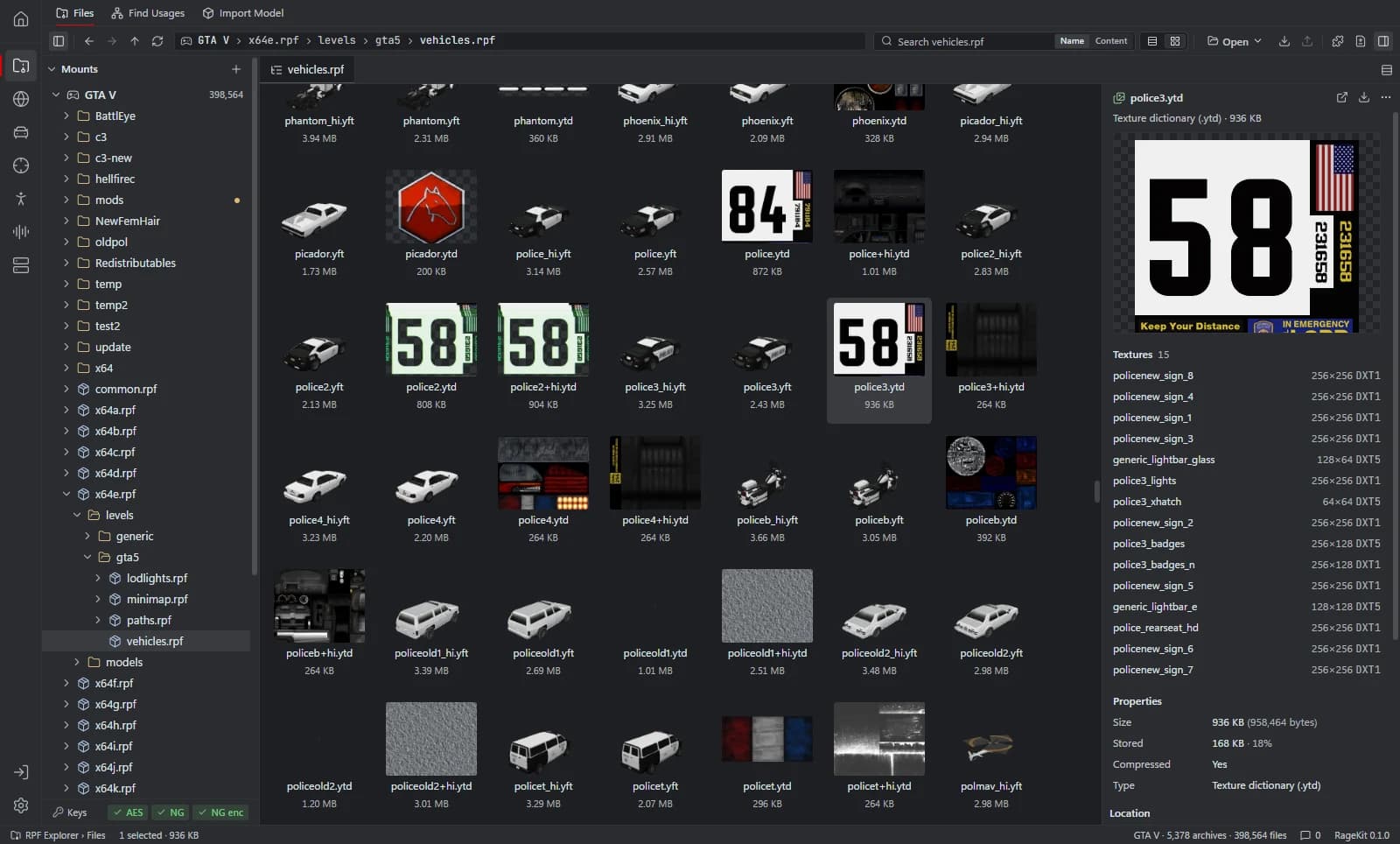
RageKit's RPF Explorer opens the RPF7 archives in your GTA V install like folders, including archives nested inside other archives, and lets you preview and edit what's inside: textures, models, maps, meta files, audio and text. On a game install everything outside mods/ is read-only, so an edit first copies the archive into the mods folder and the original files stay as they were.
What it does
- Browse nested RPF archives at any depth, with a path bar, bookmarks, thumbnails and search by name or inside text, XML and META files
- Read and write OPEN, AES and NG encrypted archives; edits are re-encrypted with the archive's own cipher
- Texture viewer for
.ytdand.ddswith channel toggles and mip list; replace textures from DDS or PNG - 3D model viewer for
.ydr,.yddand.yft, with collision and a material editor - META, PSO and RBF files (ymap, ytyp, ymt and more) shown as XML and saved back to binary
- A YMAP editor for entities and car generators, a GXT2 text editor and an AWC audio player
- Import, rename, delete, defragment and export, with converted exports (YTD to DDS and PNG, models to GLB, META to XML, AWC to WAV)
- Changes view with every modified file, a history log and one-click revert to the game version
- Compare files or folders, see mod conflicts between packs, and merge selected entries
How it works
Open your game
Choose Open GTA V. RageKit finds Rockstar, Steam and Epic installs, or you can open a single RPF or a folder.
Browse and preview
Open archives like folders and select a file to preview it: textures, models, XML, maps, text tables or audio.
Copy to mods
Choose Copy to mods (make editable). The archive is copied into the mods folder and the game's own file is left alone.
Edit and save
Replace a texture, import files, edit XML or a ymap, then save. Changed files are marked M (modified) or A (added).
Review or revert
Open the Changes view to see everything the mods folder replaces, and revert any file to the game version.
File formats
| File | RageKit | Notes |
|---|---|---|
.rpf | Reads and writes | RPF7 archives, OPEN, AES and NG encryption, nested at any depth |
.ytd / .dds / .png | Reads and writes | Texture dictionaries; export to DDS and PNG, replace from DDS or PNG |
.ydr / .ydd / .yft | Reads | 3D preview, material editing, export to .glb |
.ymap / .ytyp / .ymt | Reads and writes | Shown and edited as XML, saved back to binary |
.meta / .xml | Reads and writes | Text editor with find and replace |
.gxt2 | Reads and writes | Text tables, edited as LABEL = text |
.awc | Reads | Play streams and export them as WAV |
.ybn | Reads and writes | Collision view and edit mode |
Free and Premium
The whole RPF Explorer is free and needs no account. The only Premium action in it is exporting a Scaleform movie as a FiveM resource.
Good to know
- RPF7 (GTA V) archives only.
- No encryption keys ship with RageKit; they're read from your own game and key files.
- The hex viewer is read-only.
- GTA V Enhanced files can be opened, viewed and exported, but RageKit only writes files for GTA V Legacy.
Questions
Does editing an RPF change my game files?
No. On a game install, files outside mods/ are read-only. Copy to mods copies the archive into the mods folder first, and Revert to game version undoes a change.
Can it open encrypted RPF archives?
Yes. It reads and writes OPEN, AES and NG archives. The keys come from your own game executable or a key file already on your PC; none ship with RageKit.
Can I create a new RPF?
Yes. New archive creates an OPEN (unencrypted, for FiveM and mods), NG or AES archive.
Can it export textures as PNG?
Yes. A converted export turns a .ytd into .dds and .png files, and the texture viewer can copy the visible texture as a PNG.
Guides
- How to install mods into the GTA V mods folderUse the mods folder so game files stay untouched: copy archives to mods, replace files, enable DLC packs in dlclist.xml and install OIV packages.
- How to replace textures in a YTD fileOpen a GTA V .ytd, export textures to PNG or DDS, edit them, and replace them one by one or from a folder, then optimise oversized textures.
- GTA V file formats explained: RPF, YDR, YTD, YFT and YMAPWhat RPF, YDR, YDD, YFT, YTD, YBN, YMAP and YTYP files are, how they fit together, and which RageKit tool opens or makes each one.