 RageKit
GTA V mods manager and OIV installer
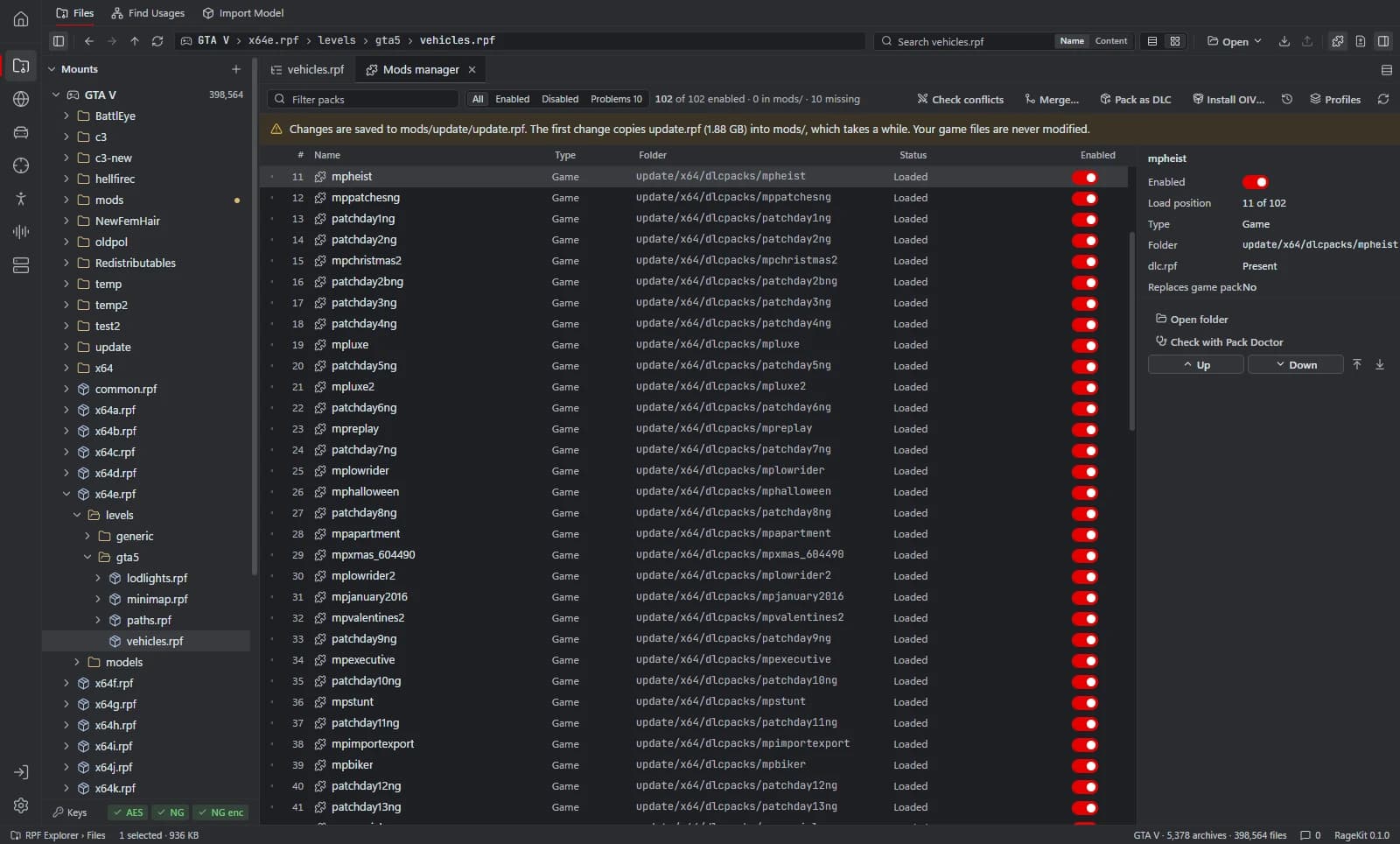
RageKit's mods manager lists every DLC pack in update/x64/dlcpacks, in the game and in the mods folder, and lets you switch packs on or off and change their load order in dlclist.xml. Its OIV installer previews every file an .oiv package will change, writes archive changes into mods/, backs up loose files first, and can roll back or uninstall.
What it does
- Enable or disable a DLC pack, which adds or removes it in
dlclist.xml - Drag packs (or Alt+Up and Alt+Down) to change their load order, then apply it
- Flags packs that are missing and folders without a
dlc.rpf - Check conflicts: lists files shipped by more than one pack and marks the one that wins in load order
- Install OIV packages (format 2.0 to 2.2) with a preview of every change, conflicts and blockers
- Rollback on failure or cancel, and uninstall from the install log
- Pack loose mod files as a DLC pack, with
setup2.xmlandcontent.xmlgenerated
How it works
Open your game
Open GTA V in the RPF Explorer and switch to the mods manager.
Review your packs
Every DLC pack is listed with its state. The first change copies update.rpf into mods/ so the game's copy stays as it was.
Switch and order
Turn packs on or off and drag them into the order you want, then apply the order.
Install an OIV
Choose Install OIV…, read the preview of every file it changes, then install. Archive edits go to mods/.
Check conflicts
Run Check conflicts to see files several packs replace, and which one the game will use.
File formats
| File | RageKit | Notes |
|---|---|---|
dlclist.xml | Reads and writes | Pack list and load order, edited in the mods folder copy |
.oiv | Reads | OIV package format 2.0 to 2.2 for GTA V |
dlc.rpf | Reads and writes | DLC pack archives; Pack as DLC builds new ones |
setup2.xml / content.xml | Writes | Generated when you pack loose files as a DLC |
Free and Premium
The mods manager, OIV installer and conflict check are free and need no account.
Good to know
- OIV packages over 4 GB (ZIP64) and multi-part zips aren't supported.
- Unknown OIV commands are reported and never run.
- Loose files outside archives (ASI plugins, scripts, .ini) go to the game folder, with a backup first; .exe files are never overwritten.
Questions
Where do OIV changes go?
Changes to files inside archives go to the mods/ folder. Loose files such as ASI plugins and .ini files go to the game folder, and RageKit backs them up first.
Can I undo an OIV install?
Yes. A failed or cancelled install rolls back, and an installed package can be uninstalled from its install log.
How do I know which mod wins when two replace the same file?
Run Check conflicts. It lists every file shipped by more than one pack and marks the one that wins in the current load order.