 RageKit
How to make an addon vehicle for FiveM
An addon vehicle is a car with its own model name that is added to the game instead of replacing a stock one. For FiveM it's a resource: the .yft and .ytd files in stream/, the vehicles.meta, handling.meta, carvariations.meta and carcols.meta in data/, and an fxmanifest.lua that registers them. In RageKit you open a car in Vehicle Studio, choose New vehicle from this one, edit it, and Build writes the whole resource.
Before you start
- RageKit on Windows 10 or 11, and your own GTA V install (or the vehicle's files from a mod).
- A FiveM server you can add a resource to, or the local dev server set up in RageKit.
- Premium for the final Build step. Everything before it is free.
Steps
Open the vehicle
In Vehicle Studio choose Open a vehicle… and pick one from the game, a DLC pack, a FiveM resource folder or an .rpf. You can also drop the files onto the window.
Make it an addon
Choose New vehicle from this one…, enter a model name (lowercase, no spaces), the name shown in game, and where to save it.
- RageKit copies the model, textures, handling and colours under the new name and writes a FiveM resource folder.
- Tick Copy the mod kit and its parts if you want the tuning parts too. Mod kits, sirens and lights get new names and free ids so they don't clash with the original.
- The engine sound stays the original car's.
Tune the handling
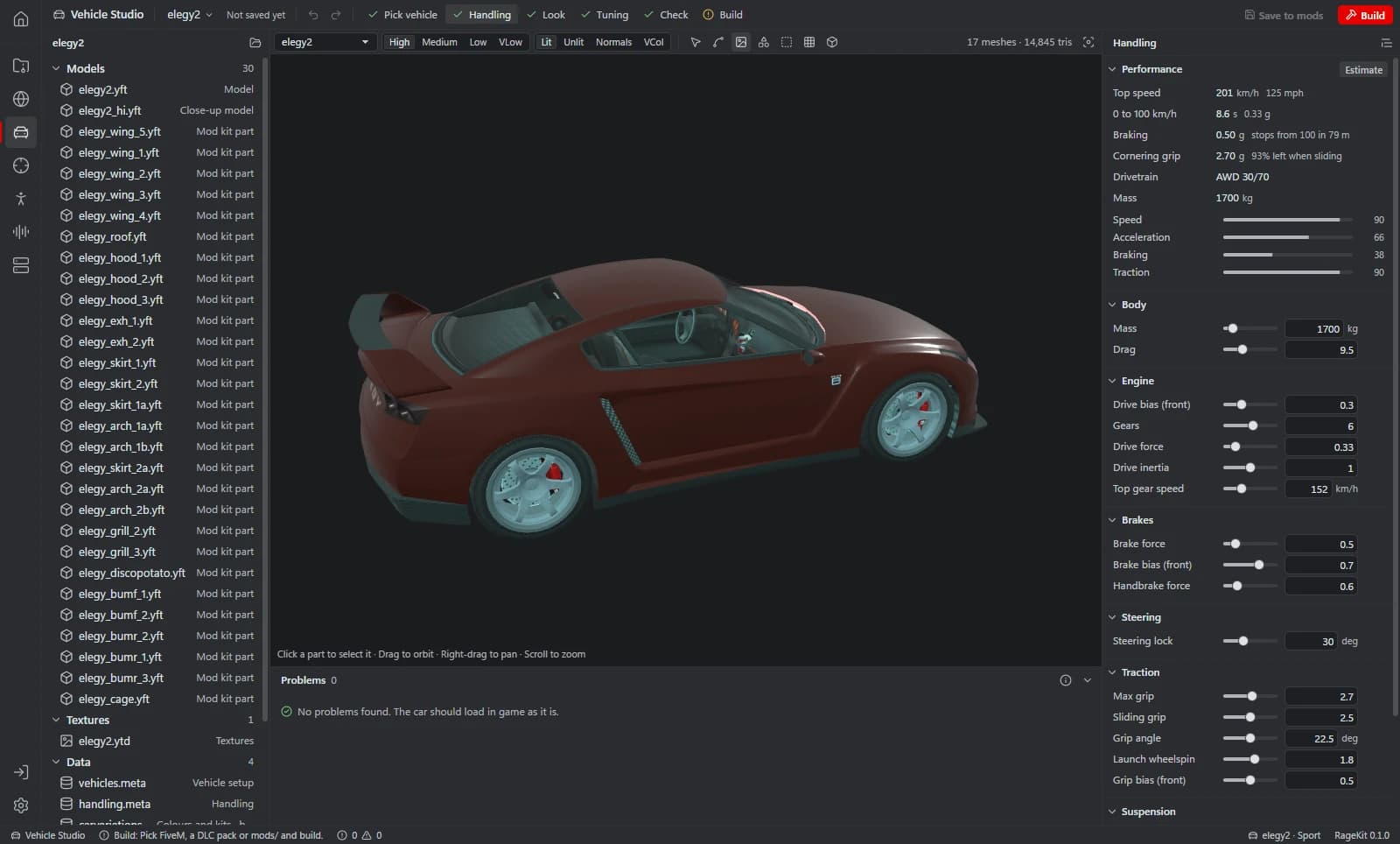
On the Handling step, change mass, drive force, top speed, gears, brakes, traction and suspension. The Performance card shows estimated speed, acceleration, braking and traction as you go.
Set the look
On the Look step, set colour combinations, the siren and light settings, and liveries.
Edit tuning parts
On the Tuning step, edit the mod kit, parts, extras and wheels, and preview one part per slot on the car.
Check
The Check step runs the built-in checks and Pack Doctor. Errors block the build; warnings don't.
Build the FiveM resource
Choose Build › FiveM resource. RageKit writes
fxmanifest.lua,stream/anddata/with the data_file lines filled in, optionally as a .zip.Start it on your server
Copy the resource folder into your server's
resources/and addensure <resource name>toserver.cfg, or use Deploy to local server. Spawn the car by its model name.
What's in an addon vehicle resource
stream/ holds the streamed files: the model (<name>.yft and <name>_hi.yft) and textures (<name>.ytd and <name>+hi.ytd), plus any livery or tuning part models.
data/ holds the metas: vehicles.meta (the model and its names), handling.meta (how it drives), carvariations.meta (colours and kits) and carcols.meta (mod kits, sirens and lights).
fxmanifest.lua lists the files and registers each meta with a data_file line so FiveM loads it before the vehicle spawns.
Common problems
The car spawns with stock handling: the handlingName in vehicles.meta must match the handlingName of the entry in handling.meta. RageKit keeps them in step.
Two cars share a look or a siren: two resources ship the same file name, mod kit id or siren id. Run Server Doctor over the server to find stream conflicts and id clashes.
Questions
What's the difference between an addon and a replacement vehicle?
A replacement overwrites a stock car, so the original disappears. An addon has its own model name and sits alongside every stock car.
Do I need to write fxmanifest.lua by hand?
No. Build writes fxmanifest.lua with the files and data_file lines for the metas it ships.
Can I build the same car for singleplayer?
Yes. Build also offers a singleplayer DLC pack, an OIV package and a copy in the game's mods folder.
Tools in this guide
Related guides
- How to edit handling.meta in GTA V and FiveMWhat the main handling.meta fields do (mass, drive force, top speed, drive bias, traction, suspension) and how to tune them with live estimates.
- How to add a livery to a GTA V vehicleMake a UV template, paint your livery in any image editor with a live 3D preview, and write it into the vehicle's .ytd without a separate texture tool.
- How to make custom siren sounds for FiveMTurn WAV siren tones into a GTA V audio pack, link them to emergency vehicles with a script or natively, and build it for FiveM or singleplayer.
Get RageKit
Free for Windows 10 and 11. No account needed.
There's no Windows installer on the latest release yet. Check the changelog for when it lands.