 RageKit
Convert FBX, OBJ and glTF to YDR, YFT and YDD
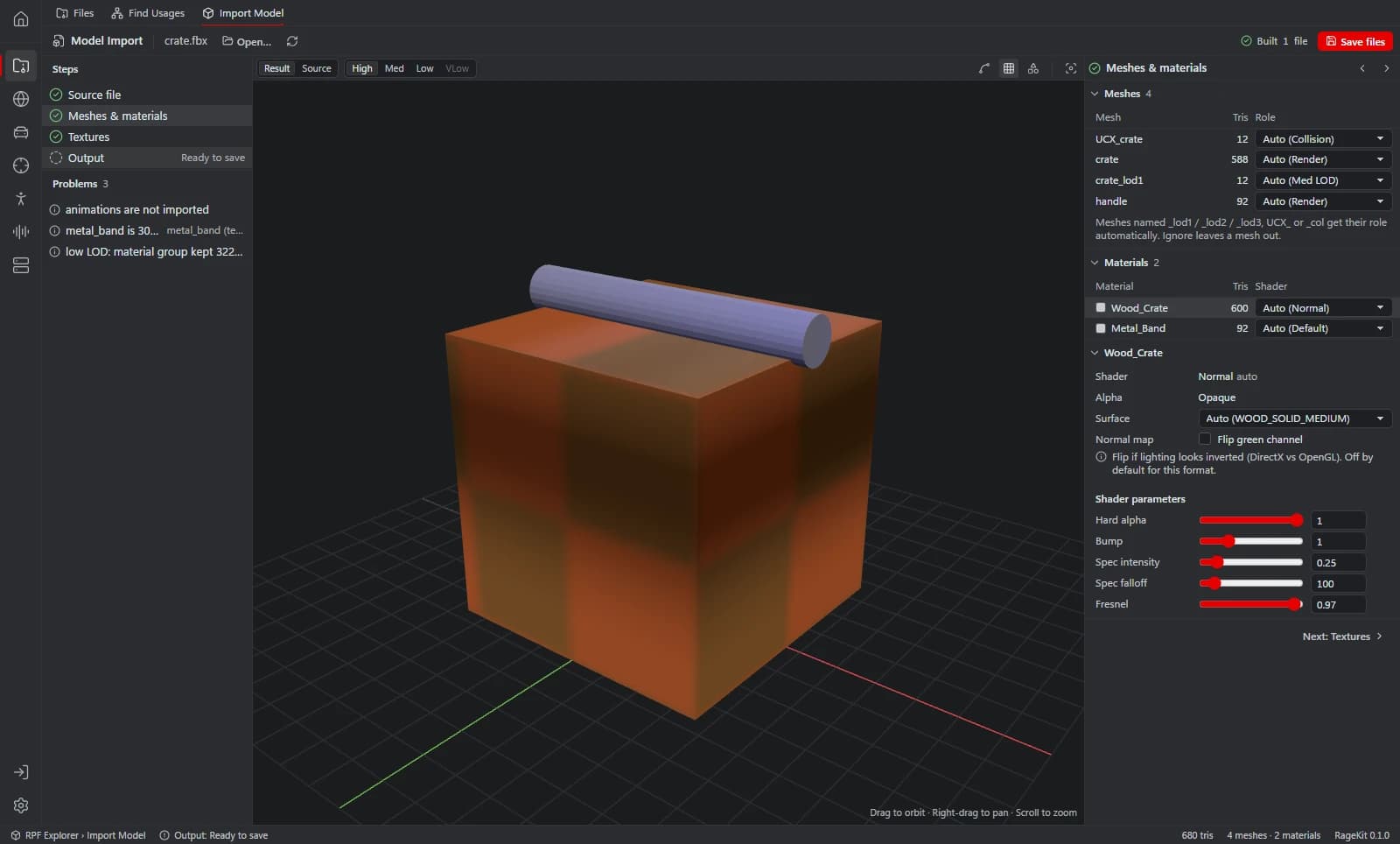
RageKit's Model Import converts .fbx, .obj, .gltf and .glb files into GTA V models: a drawable (.ydr), a fragment (.yft) or ped clothing (.ydd). It sets up shaders, compresses textures into an embedded or separate .ytd, builds LODs and generates collision (.ybn), with a live preview that rebuilds as you change settings.
What it does
- Reads binary and ASCII FBX (2011 and newer), OBJ with MTL, glTF and GLB
- Outputs a drawable (.ydr), a fragment (.yft) or ped clothing (.ydd) skinned to the freemode skeleton
- About 21 shader presets, including normal, specular, emissive, decal, cutout and glass
- Textures from PNG, JPG, TGA, BMP or DDS, resized to powers of two and compressed to BC1, BC3, BC5 or BC7, embedded or as a separate .ytd
- LODs simplified from the high mesh with editable distances, or your own
_lod1to_lod3meshes - Collision: generated primitives and hulls, a simplified mesh, a bounding box, or your own UCX_ / _col meshes, stored in the model, as a .ybn, or both
- Up axis, scale, units and pivot controls, and a Problems panel before you save
How it works
Choose a file
Choose file… or drop an FBX, OBJ, glTF or GLB onto the window.
Meshes and materials
Pick the output type, set each mesh's role (render, LOD, collision) and choose a shader per material.
Textures
Embed textures or write a separate .ytd, and pick the size and compression.
Check the preview
Compare Result and Source, step through LODs, and turn on wireframe or collision.
Save files
Save to a folder, or into mods/ on a game mount.
File formats
| File | RageKit | Notes |
|---|---|---|
.fbx | Reads | Binary and ASCII, FBX 2011 and newer |
.obj + .mtl | Reads | Materials from the MTL file |
.gltf / .glb | Reads | Not Draco or meshopt compressed |
.ydr | Writes | Drawable (props and static models) |
.yft | Writes | Fragment, a single rigid body |
.ydd | Writes | Ped clothing for mp_m / mp_f_freemode_01 |
.ytd | Writes | Texture dictionary, BC1 / BC3 / BC5 / BC7 or uncompressed |
.ybn | Writes | Static collision |
Free and Premium
Model Import is free and needs no account. It saves files; packaging them as a FiveM resource or DLC pack happens in Map Studio or another studio's Build.
Good to know
- It converts finished models. It doesn't model, rig or animate.
- A .yft is a single rigid body: no breakable or multi-part fragments.
- FBX older than 2011, Draco or meshopt compressed glTF and files over 1 GB are refused.
- GTA V Enhanced files can be opened, viewed and exported, but RageKit only writes files for GTA V Legacy.
Questions
Do I need 3ds Max or Blender to make a YDR?
Not for the conversion. You still need a 3D app to make the model, but RageKit turns the exported FBX, OBJ or glTF into a .ydr directly.
Does it make collision?
Yes. It can generate collision from primitives and hulls, a simplified mesh or a bounding box, or use your own UCX_ or _col meshes, stored in the model, as a .ybn, or both.
Can I import clothing?
Yes, rigged clothing becomes a .ydd skinned to the freemode skeleton. Bones are matched by name. The Clothing Studio uses the same importer.
Guides
- How to convert FBX to YDR for GTA VConvert an FBX, OBJ or glTF model into a GTA V .ydr with shaders, a texture dictionary, LODs and collision, without 3ds Max. Step by step, free.
- How to make a custom map (ymap) for FiveMPlace props and your own models, build an MLO interior if you need one, generate LODs, and build the ymap and ytyp into a FiveM map resource.
- GTA V file formats explained: RPF, YDR, YTD, YFT and YMAPWhat RPF, YDR, YDD, YFT, YTD, YBN, YMAP and YTYP files are, how they fit together, and which RageKit tool opens or makes each one.