 RageKit
How to convert FBX to YDR for GTA V
A .ydr is a GTA V drawable: a model with its shaders and, optionally, embedded textures. To convert an FBX you need to map materials to GTA V shaders, compress textures into a .ytd, and add LODs and collision. RageKit's Model Import does this in one window: open the FBX, OBJ or glTF, pick Drawable (.ydr), check the preview and save. It's free.
Before you start
- A model exported as FBX (2011 or newer), OBJ with MTL, glTF or GLB.
- Its textures as PNG, JPG, TGA, BMP or DDS.
- A simple, lowercase model name: only a to z, 0 to 9 and underscores are kept.
Steps
Open the model
Open Model Import and choose Choose file…, or drop the file on the window.
Fix the orientation and size
Set the up axis (auto, Y or Z), scale or the file's own units, and the pivot (source, bottom or centre).
Pick the output
Choose Drawable (.ydr) for a prop or static model. Fragment (.yft) is for a physical object; Ped clothing (.ydd) for clothing.
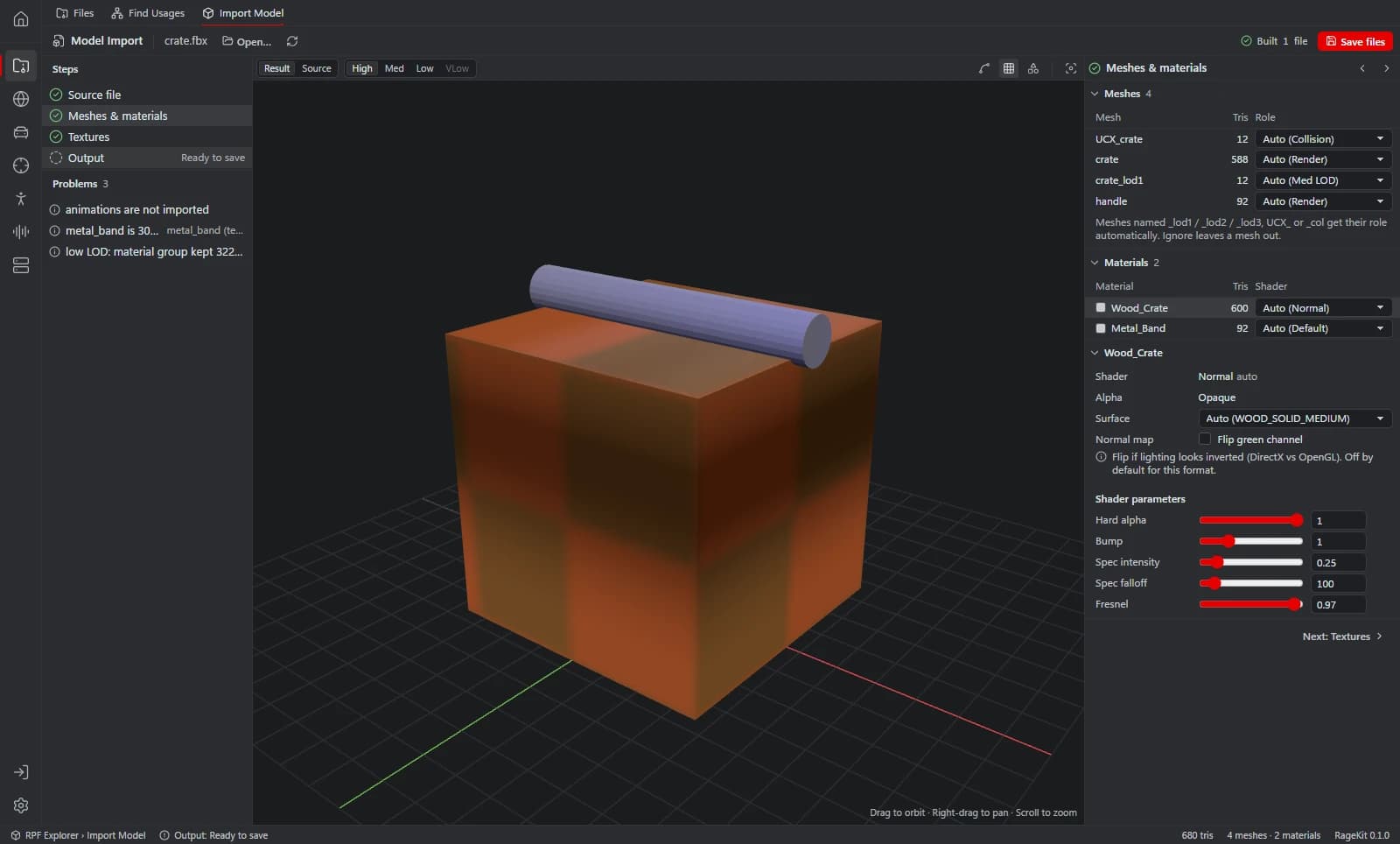
Set mesh roles and shaders
Each mesh is render, LOD, collision or ignored. Pick a shader preset per material: default, normal, specular, emissive, decal, cutout or glass.
- Use Flip green channel if a normal map looks inverted.
Set up textures
Embed textures or write a separate .ytd. Pick the maximum size and compression: Auto (BC1 or BC3 depending on alpha), BC1, BC3, BC5, BC7 or uncompressed.
Add LODs and collision
Generate LODs from the high mesh or use your own
_lod1to_lod3meshes. Generate collision, or use your own UCX_ or _col meshes, stored in the model, as a .ybn, or both.Check the preview
Compare Result and Source, step through LODs, and read the Problems panel.
Save
Choose Save files. To put the model in the world, add it to a Map Studio project.
Which file type to choose
.ydr (drawable): static props and buildings. The most common choice.
.yft (fragment): a physical object. RageKit writes a single rigid body; breakable, multi-part fragments aren't supported.
.ydd (drawable dictionary): ped clothing, skinned to the freemode skeleton.
Questions
Do I need 3ds Max and GIMS?
Not for the conversion. You still model in any 3D app, then RageKit converts the exported file. See RageKit vs 3ds Max + GIMS.
Why is my FBX refused?
FBX files older than 2011, Draco or meshopt compressed glTF and source files over 1 GB aren't supported.
Can I convert OBJ to YDR?
Yes. OBJ with its MTL file works the same way, as do glTF and GLB.
Tools in this guide
Related guides
- How to make a custom map (ymap) for FiveMPlace props and your own models, build an MLO interior if you need one, generate LODs, and build the ymap and ytyp into a FiveM map resource.
- GTA V file formats explained: RPF, YDR, YTD, YFT and YMAPWhat RPF, YDR, YDD, YFT, YTD, YBN, YMAP and YTYP files are, how they fit together, and which RageKit tool opens or makes each one.
Get RageKit
Free for Windows 10 and 11. No account needed.
There's no Windows installer on the latest release yet. Check the changelog for when it lands.