 RageKit
What is an RPF file and how do you open one?
An .rpf file is a RAGE Package File: the archive format GTA V keeps its files in. One RPF holds folders and files, often with more RPFs nested inside, and can be unencrypted (OPEN) or encrypted (AES or NG). To open one, use an RPF explorer. RageKit's RPF Explorer opens RPF7 archives like folders, previews what's inside and extracts or edits the files.
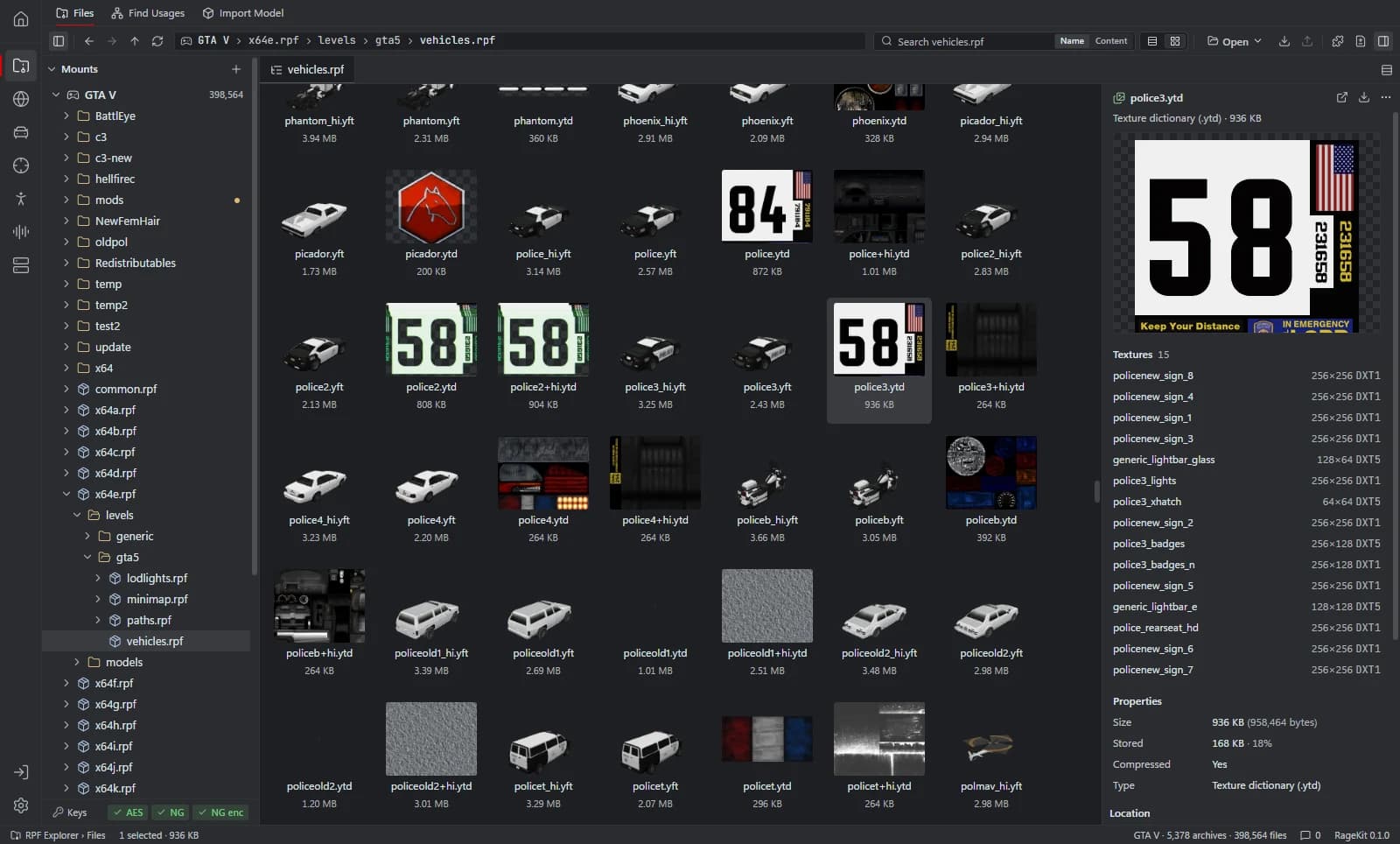
What's inside a .rpf file
- Folders and files, like a zip: models, textures, maps, meta files, audio and text.
- Other
.rpfarchives.update.rpfand thex64*.rpfarchives hold many nested ones, and a DLC pack is adlc.rpf. - An encryption mode. OPEN is unencrypted and is what FiveM and most mods use; NG is what the unmodified game expects for its own archives and DLC packs; AES is a third mode some archives use.
How to open a .rpf file
Open where the file is
In the RPF Explorer choose Open GTA V to browse the game's archives, Open RPF… (Ctrl+O) for a single archive, or Open folder… for loose files such as a FiveM resource. Dropping an
.rpfor a folder onto the window opens it too.Browse it like a folder
Open an archive by double-clicking it. Nested archives open the same way, at any depth. Search finds files by name, or by text inside XML and META files.
Preview a file
Select a file to preview it: textures, 3D models, maps, XML, text tables or audio.
Extract files
Select files or folders and choose Export. Converted turns textures into DDS and PNG, models into GLB, META into XML and AWC audio into WAV.
Edit safely
Game files are read-only. To change one, choose Copy to mods first: the archive is copied into the
mods/folder and the original stays as it was.
What RageKit does with .rpf files
- Open RPF7 archives with OPEN, AES and NG encryption, nested at any depth
- Extract files as they are, or converted to DDS, PNG, GLB, XML and WAV
- Import, rename and delete files, and defragment an archive
- Create a new OPEN, NG or AES archive
- See every change the mods folder makes and revert a file to the game version
Tools that read and write .rpf
| Tool | RageKit | Notes |
|---|---|---|
| RPF Explorer | Reads and writes | RPF7 archives, OPEN, AES and NG encryption, nested at any depth |
| Mods manager and OIV installer | Reads and writes | DLC pack archives; Pack as DLC builds new ones (Premium) |
Questions
What program opens RPF files?
An RPF explorer for GTA V. RageKit's RPF Explorer is free for Windows 10 and 11 and opens the archives in your game, a single .rpf, or a folder of loose files.
Can I extract files from an RPF?
Yes. Select the files or folders and choose Export. You can copy them out as they are, or converted: .ytd to DDS and PNG, models to .glb, META to XML and .awc to WAV.
Why can't I edit an RPF in the game folder?
RageKit keeps everything outside mods/ read-only so a mistake can't break the game. Copy to mods copies the archive into the mods folder, and you edit that copy.
Does it open RPF files from other Rockstar games?
No. RageKit reads RPF7, the GTA V version of the format.
Guides
- How to install mods into the GTA V mods folderUse the mods folder so game files stay untouched: copy archives to mods, replace files, enable DLC packs in dlclist.xml and install OIV packages.
- GTA V file formats explained: RPF, YDR, YTD, YFT and YMAPWhat RPF, YDR, YDD, YFT, YTD, YBN, YMAP and YTYP files are, how they fit together, and which RageKit tool opens or makes each one.
Related file formats
- .oiv · OIV packageAn OIV file is an installable GTA V mod package. How to preview what an .oiv changes, install it into the mods folder, and roll it back or uninstall it.
- .ytd · texture dictionaryA YTD file is a GTA V texture dictionary. How to open and view .ytd files, export textures to PNG or DDS, replace a texture and shrink oversized ones.
- .ydr · drawableA YDR file is a GTA V drawable: one 3D model with its shaders and LODs. How to open and view .ydr files, export them to GLB and make one from FBX or OBJ.
- .meta · meta data fileA .meta file is a GTA V data file in XML: handling.meta, vehicles.meta, weapons.meta, peds.meta and more. How to open and edit them, with or without XML.
- GlossaryEvery GTA V modding format and term on one page
Open .rpf files with RageKit
Free download for Windows 10 and 11. No account needed for the free tools.
There's no Windows installer on the latest release yet. Check the changelog for when it lands.