 RageKit
What is a YTD file and how do you open one?
A .ytd file is a GTA V texture dictionary: a set of textures, each with a compression format and mipmaps, that models' shaders look up by name. RageKit opens a .ytd in a texture viewer, exports its textures as PNG or DDS, replaces a texture from a PNG or DDS file, and its texture tools resize and recompress whole folders of them.
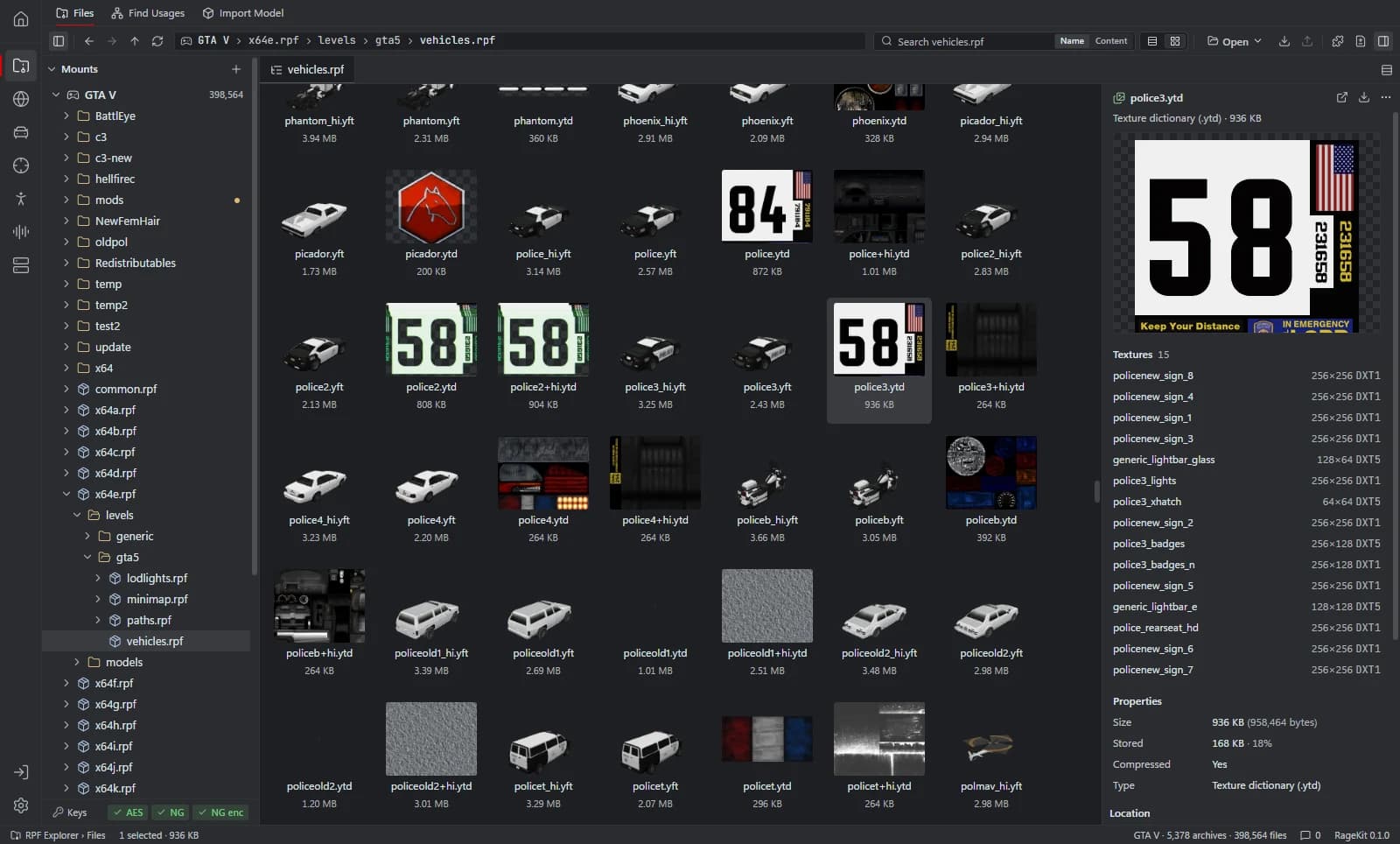
What's inside a .ytd file
- Named textures: diffuse, normal and specular maps, liveries, signs and so on.
- Each texture's size, block compression format (BC1, BC3, BC5, BC7 or uncompressed) and mipmaps.
- Vehicles have a second, high-detail dictionary named
<name>+hi.ytd.
How to open a .ytd file
Open where the file is
In the RPF Explorer choose Open GTA V to browse the game's archives, Open RPF… (Ctrl+O) for a single archive, or Open folder… for loose files such as a FiveM resource. Dropping an
.rpfor a folder onto the window opens it too.Select the .ytd
The Textures view lists every texture with its size and format. Channel toggles show red, green, blue and alpha on their own, and the mip list shows each mipmap.
Export the textures
Choose Export this file. Converted writes each texture as
.ddsand.png.Replace a texture
Replace a texture from a DDS or PNG file, then save. Game files are read-only. To change one, choose Copy to mods first: the archive is copied into the
mods/folder and the original stays as it was.
What RageKit does with .ytd files
- View every texture with channel toggles and its mipmaps
- Export textures as DDS and PNG
- Replace a texture from a DDS or PNG file
- Resize, recompress (BC1 to BC7) and rebuild mipmaps for every
.ytdbelow a folder with the texture tools - Build a
.ytdfrom a folder of images
Tools that read and write .ytd
| Tool | RageKit | Notes |
|---|---|---|
| RPF Explorer | Reads and writes | Texture dictionaries; export to DDS and PNG, replace from DDS or PNG |
| Vehicle Studio | Reads and writes | Textures; liveries are written into the .ytd |
| Clothing Studio | Reads and writes | Texture variants |
| Find Usages and hash lookup | Reads | Models and the textures their shaders use |
| Model Import | Writes | Texture dictionary, BC1 / BC3 / BC5 / BC7 or uncompressed |
| World Viewer | Reads | Models and textures rendered in 3D |
| Map Studio | Reads and writes | Your textures and generated LOD atlases |
| Weapon Studio | Reads | Weapon model and textures |
| Tattoo & Overlay Studio | Writes | One per tattoo |
Questions
What program opens YTD files?
RageKit's RPF Explorer opens .ytd files in a texture viewer, inside a game archive or loose in a folder. It's free for Windows.
How do I convert a YTD to PNG?
Select the .ytd, choose Export this file and pick Converted. Each texture is written as a .png and a .dds.
How do I edit a texture in a YTD?
Export it as PNG, edit it in an image editor, then replace the texture in the .ytd from your PNG. See Replace textures in a YTD.
Which compression should a texture use?
BC1 (DXT1) for textures without alpha, BC3 (DXT5) for textures with alpha, BC5 for normal maps and BC7 for higher-quality colour.
Guides
- How to replace textures in a YTD fileOpen a GTA V .ytd, export textures to PNG or DDS, edit them, and replace them one by one or from a folder, then optimise oversized textures.
- How to add a livery to a GTA V vehicleMake a UV template, paint your livery in any image editor with a live 3D preview, and write it into the vehicle's .ytd without a separate texture tool.
Related file formats
- .ydr · drawableA YDR file is a GTA V drawable: one 3D model with its shaders and LODs. How to open and view .ydr files, export them to GLB and make one from FBX or OBJ.
- .ydd · drawable dictionaryA YDD file is a GTA V drawable dictionary: several models in one file, used for ped clothing, heads and hair. How to open, view and make .ydd files.
- .yft · fragmentA YFT file is a GTA V fragment: a model with physics, used for vehicles and breakable objects. How to open and view .yft files and export them to GLB.
- .rpf · RPF archiveAn RPF file is a GTA V archive that holds the game's models, textures, maps and data. How to open, extract and edit .rpf files on Windows for free.
- GlossaryEvery GTA V modding format and term on one page
Open .ytd files with RageKit
Free download for Windows 10 and 11. No account needed for the free tools.
There's no Windows installer on the latest release yet. Check the changelog for when it lands.