 RageKit
How to add a custom addon weapon to FiveM
An addon weapon is a weapon with its own name, such as WEAPON_MYGUN, that is added to the game instead of replacing a stock one. For FiveM it's a resource: weapons.meta and its related metas in data/, the model and textures in stream/, and an fxmanifest.lua that registers each meta with a data_file line. In RageKit you open a stock weapon in Weapon Studio, choose Make an addon copy…, tune it, and Build writes the resource.
Before you start
- Premium: Weapon Studio needs it. See Free and Premium.
- RageKit on Windows 10 or 11, and your own GTA V install: the game's stock weapons are the templates new weapons start from.
- A FiveM server you can add a resource to, or the local dev server set up in RageKit.
Steps
Open a weapon
In Weapon Studio choose Open a weapon… and pick the stock weapon closest to the one you want. You can search by name, model or group. Try an example opens the game's pistol.
Make it an addon
On the Weapon step choose Make an addon copy…. Enter a Weapon name in capital letters (
WEAPON_is added for you), choose where to save it, and choose Create weapon.- The copy starts with the original's stats, components and animations, and gets its own slot,
SLOT_<name>. - Fill in New model name to copy the model and its textures under that name, with a
weaponarchetypes.metaentry. Leave it empty to keep using the original model. - Own copies of the weapon's own components is ticked by default, so clip sizes can change without touching the original. Shared parts such as scopes and suppressors stay shared.
- It's saved as a FiveM resource folder named after the weapon, which the studio opens next.
- The copy starts with the original's stats, components and animations, and gets its own slot,
Tune damage and fire
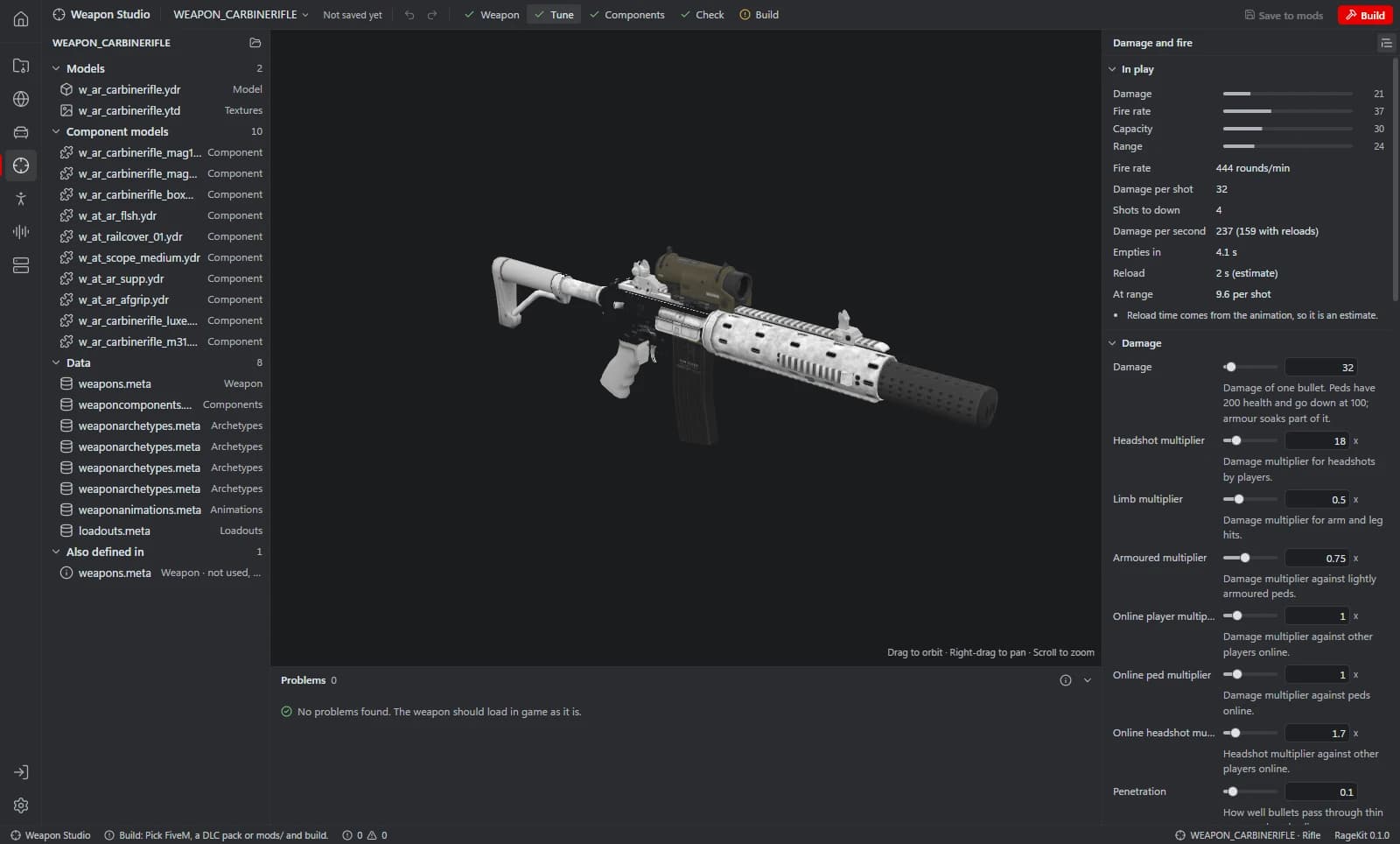
On the Tune step, change the values under Damage, Fire, Ammo and Range. The In play card shows fire rate, damage per shot, shots to down and damage per second, and updates while you drag a slider.
- If the weapon still uses the game's ammo type, Give it its own ammo makes a separate ammo pool, so ammo limits change without touching other weapons.
Fit components
On the Components step choose Add a component… and pick a magazine, scope, suppressor, flashlight or skin and the attach point it goes on. The star makes a component the default for its bone, and the eye shows it in the 3D preview.
Check
The Check step counts errors, warnings and notes, and the Problems panel under the preview lists each one. Click a problem to go to the setting that fixes it. Run Pack Doctor checks the whole pack on disk.
Build the FiveM resource
Choose Build, pick FiveM resource, enter a resource name and a folder, then Check and Build. The metas go in
data/with theirdata_filelines infxmanifest.lua, and the models instream/.Start it on your server
Copy the resource folder into your server's
resources/and addensure <resource name>toserver.cfg, or pick Deploy to local server in the Build dialog. Scripts give the weapon by its weapon name.
What's in an addon weapon resource
data/weapons.meta: the weapon's entry, with its stats, slot and ammo. Registered as WEAPONINFO_FILE.
data/weaponcomponents.meta: the weapon's own components, such as its magazines. Registered as WEAPONCOMPONENTSINFO_FILE.
data/weaponarchetypes.meta (WEAPON_METADATA_FILE) and data/weaponanimations.meta (WEAPON_ANIMATIONS_FILE): the model's entry and the animation sets peds use with the weapon.
data/loadouts.meta (LOADOUTS_FILE): only if you added the weapon to a loadout.
stream/: the weapon's .ydr model and .ytd textures, and its component models.
Common problems
The weapon has no name in the weapon wheel: the name label has no text. RageKit doesn't write label text; add it with AddTextEntry in a FiveM client script.
Peds hold and fire the weapon without proper animations: it has no weaponanimations.meta entries. On the Weapon step, Copy animations copies the sets of a stock weapon of the same group.
A new model doesn't load: the game only loads a pack's own model with a weaponarchetypes.meta entry. Add a weaponarchetypes entry creates one.
Questions
What's the difference between an addon and a replacement weapon?
A weapon that keeps a stock name, such as WEAPON_PISTOL, replaces the game's weapon. An addon has a name the game doesn't use, so both exist. Weapon Studio shows which one you have under Mode.
Do I need to edit weapons.meta by hand?
No. The settings are sliders, switches and lists, and each change is one undo step. A Raw XML section holds the entry as it's written, for anything the controls don't cover.
Can I build the same weapon for singleplayer?
Yes. Build also offers a singleplayer DLC pack, an OIV package and a copy in the game's mods folder.
How do I give an addon weapon its own model?
Fill in New model name when you make the addon copy. The model and its textures are copied under that name into the resource's stream/ folder, with a weaponarchetypes.meta entry, so you can replace them later.
Tools in this guide
Related guides
- How to make an addon vehicle for FiveMStep by step: turn a GTA V car into a FiveM addon vehicle with its own model name, handling, colours and sirens, then build and start the resource.
- How to install mods into the GTA V mods folderUse the mods folder so game files stay untouched: copy archives to mods, replace files, enable DLC packs in dlclist.xml and install OIV packages.
- GTA V file formats explained: RPF, YDR, YTD, YFT and YMAPWhat RPF, YDR, YDD, YFT, YTD, YBN, YMAP and YTYP files are, how they fit together, and which RageKit tool opens or makes each one.
Get RageKit
Free download for Windows 10 and 11. No account needed for the free tools.
There's no Windows installer on the latest release yet. Check the changelog for when it lands.