 RageKit
How to make a timecycle modifier for FiveM
A timecycle modifier is a named set of overrides for GTA V's timecycle variables: sky, sun, fog, lights, post effects and colour correction. FiveM can't load edited weather files from a resource, but it can load modifiers, so a custom look ships as a timecycle_mods file registered with TIMECYCLEMOD_FILE and is switched on with SetTimecycleModifier. In RageKit's Timecycle Studio you edit a weather with a live preview, choose Make a modifier from this weather's changes, and build the resource.
Before you start
- Premium: Timecycle Studio needs it. See Free and Premium.
- Your GTA V install. Timecycle Studio reads the weathers and modifiers from it.
- A FiveM server, and a client script of your own to switch the modifier on. RageKit doesn't write that script.
Steps
Open the game
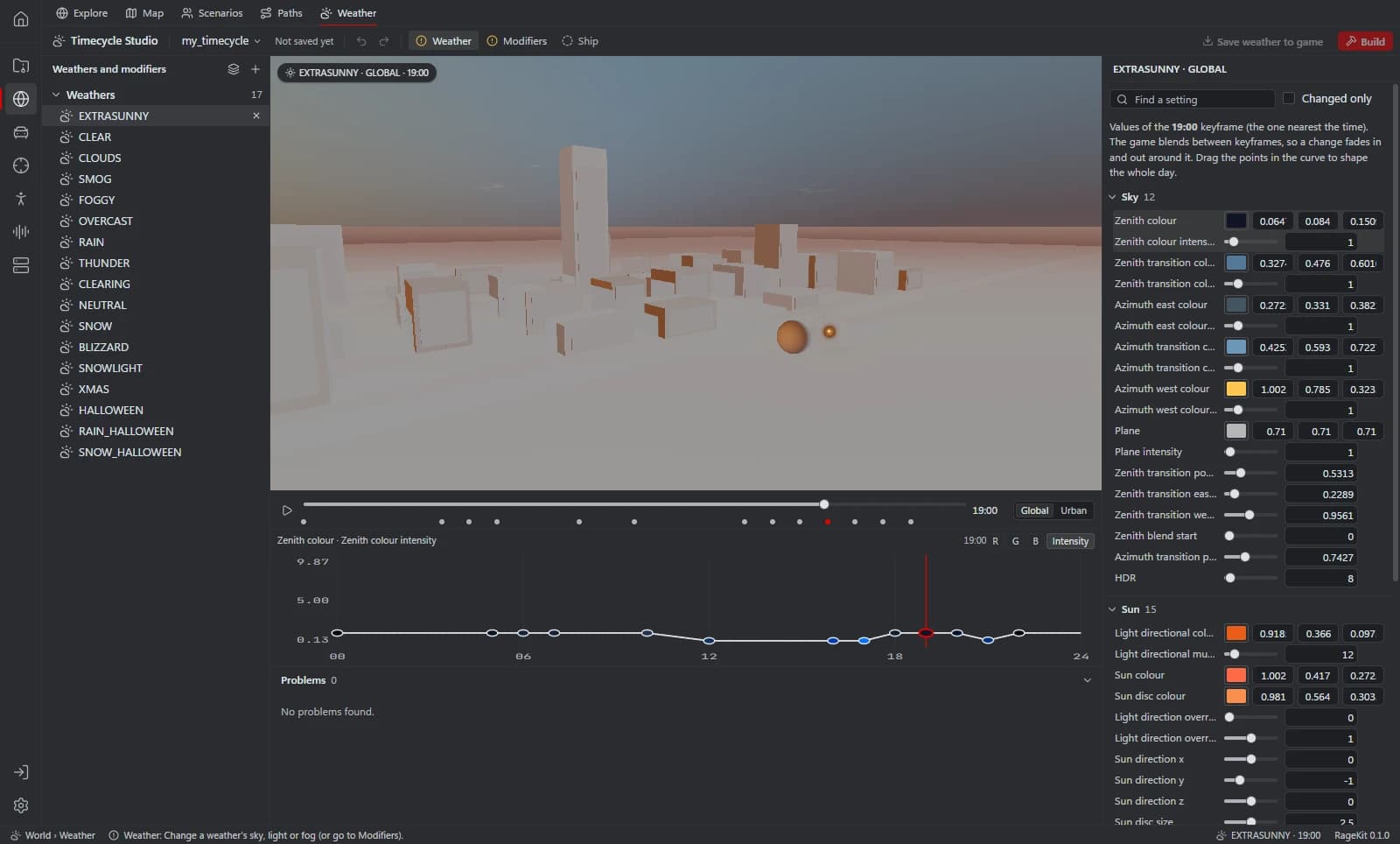
Open World › Weather and choose Open your GTA V folder…. The game's weathers are listed on the left.
Pick a weather and a time
Select a weather, such as EXTRASUNNY, and move the time slider to the hour you want to change. Play the day runs through the day at one game hour per second, and Region switches between Global and Urban.
Change the look
In the inspector, change settings by group: Sky, Sun, Moon and stars, Clouds, Fog and haze, Lights, Post effects, Colour correction, Water, and World, shadows and LOD. The preview updates as you drag.
- Values belong to the keyframe nearest the time, and the game blends between keyframes. Drag the points in the curve to shape the whole day.
- Find a setting searches by name, and Changed only lists what you've edited.
Make a modifier from the changes
Choose Make a modifier from these changes at the top of the inspector. The settings you changed in that weather and region, with their values at the current time, become a new modifier.
- You can also start without a weather: New modifier makes an empty one, and Edit a game modifier… opens one of the game's to Edit or Copy as new.
Adjust the modifier
Give the modifier a Name; scripts switch it on by this name. Add a setting… adds an override, and A is its value. Move Strength to preview the modifier at less than 100% over the current weather.
Build the FiveM resource
Choose Build, pick FiveM resource, then Check and Build. The resource holds the project's modifiers in one
timecycle_mods_<project name>.xmlfile with aTIMECYCLEMOD_FILEdata_file line.Switch it on
Start the resource on your server, then call
SetTimecycleModifierwith the modifier's name from a client script.
Weather files and modifiers
A weather cycle file (w_*.xml) holds every variable's value at each keyframe of the day, per region. The game blends between keyframes.
A modifier holds fixed overrides with no time of day. That's why a modifier made from a weather takes the values at the hour shown.
FiveM can't load weather from a resource: weather types and their cycles are files the game reads once at startup, and FiveM's weather natives only switch between the built-in weathers.
For singleplayer, Save weather to game writes the changed weathers into mods/, and Export files… saves them as w_*.xml files.
Common problems
The modifier does nothing: it has no overrides yet, or the name in your script isn't the modifier's Name.
Night looks wrong: a modifier made at midday holds midday values at every hour. Make a second modifier at a night hour and switch between them in your script.
The game looks different from the preview: the preview is a sample city block, not the real game world. Test in game.
Questions
Can FiveM load a custom weather file?
No. FiveM can't load weather types or their w_*.xml cycles from a resource. Make a modifier from the weather's changes, build that, and switch it on over the closest built-in weather.
How do I turn on a timecycle modifier in FiveM?
Call SetTimecycleModifier with the modifier's name from a client script once the resource has started. RageKit builds the resource; the script is yours to write.
Can I edit one of the game's own timecycle modifiers?
Yes. Edit a game modifier… lists the modifiers in your install. Edit changes one under its own name, and shipping it replaces the game's version. Copy as new starts a new modifier from it.
Does a modifier work in singleplayer?
Yes. Modifiers also build as a singleplayer DLC pack, an OIV package or a copy in the game's mods folder.
Tools in this guide
Related guides
- How to make a custom map (ymap) for FiveMPlace props and your own models, build an MLO interior if you need one, generate LODs, and build the ymap and ytyp into a FiveM map resource.
- How to install mods into the GTA V mods folderUse the mods folder so game files stay untouched: copy archives to mods, replace files, enable DLC packs in dlclist.xml and install OIV packages.
- GTA V file formats explained: RPF, YDR, YTD, YFT and YMAPWhat RPF, YDR, YDD, YFT, YTD, YBN, YMAP and YTYP files are, how they fit together, and which RageKit tool opens or makes each one.
Get RageKit
Free download for Windows 10 and 11. No account needed for the free tools.
There's no Windows installer on the latest release yet. Check the changelog for when it lands.